PESCO Bill Online Check September 2026 – View & Download
To check your PESCO bill online, enter your 14-digit reference number or 10-digit consumer ID in the search box below. Our tool connects directly to the official PITC billing database to generate your latest electricity bill, amount due, and payable date.

PESCO Bill Online
Whip out any old PESCO bill for the Reference Number or Consumer ID, type it below, and watch your current bill come up live from PITC within seconds.
Real-Time PITC DataThis tool queries public billing data from the official PITC server. No personal data, reference numbers, or billing records are stored on our servers.
How to Check and Print Your PESCO Duplicate Bill Online
Accessing an authentic duplicate copy of your monthly electricity bill takes only a few seconds. Whether your paper bill was misplaced, delayed in transit, or damaged, you can retrieve, save, and print a verified statement directly from your phone or computer.
Method 1: Using the 14-Digit Reference Number (Recommended)
The 14-digit reference number is the primary identifier assigned to every electrical meter connection by PESCO.
- Locate your reference number: Look at the top-left area of any previous electricity bill statement under the “CONSUMER DETAIL” section.
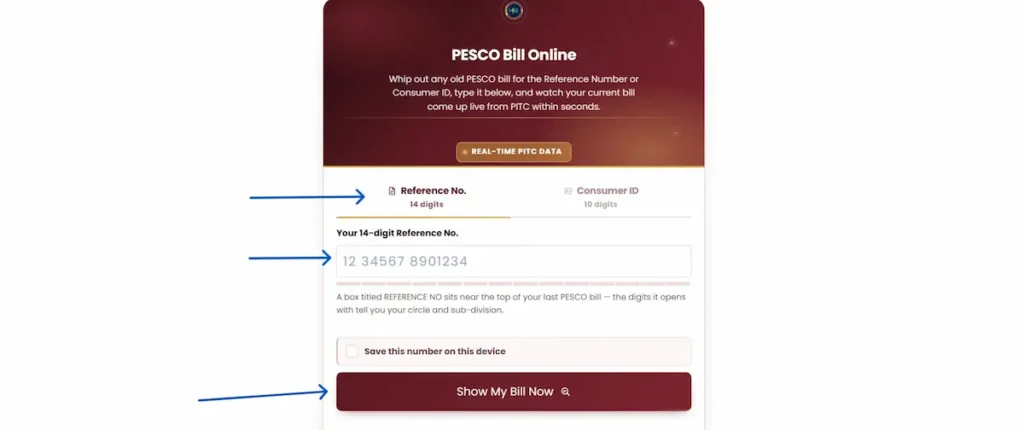
- Enter the 14 digits: Select the Reference No. (14 digits) tab in the search tool above and enter the complete numerical sequence without spaces or dashes.
- Save and retrieve: Check the box labeled “Save this number on this device” so your browser remembers the number for future billing cycles, then click Show My Bill Now.
Method 2: Using the 10-Digit Consumer / Customer ID
Computerized billing systems in Khyber Pakhtunkhwa also assign a unique 10-digit Consumer ID to residential and commercial accounts.
- Find your Consumer ID: Look directly beneath your reference number on your printed statement.
- Switch input tab: Select the Consumer ID (10 digits) tab on the lookup tool.
- Submit: Type your 10-digit ID and click Show My Bill Now to pull the identical billing record.
Step-by-Step Bill Display on the Official PITC Gateway
After clicking the search button, your request routes directly to the centralized PITC Bill Gateway.
- Verify Bill Details: Confirm your meter readings, issue date, total payable amount within the due date, and applicable late surcharges.
- Download as PDF: Press
Ctrl + Pon Windows orCmd + Pon Mac, choose Save as PDF in the printer destination dropdown, and save the file to your device. - Print for Banking: Print the generated web bill on standard A4 paper. Commercial bank counters, microfinance branches, and post offices accept this printed duplicate copy without restrictions.
Anatomy of a PESCO Bill: Locating Your Billing Identifiers
Understanding the layout of your monthly statement helps you verify meter readings, track energy consumption trends, and avoid overbilling errors.
                  14-Digit Reference Number Structure
   ┌────────────┬──────────────────────┬───────────────────────┬────────────┐
   │   05 (2)   │      26913 (5)       │      0478800 (7)      │   U / R    │
   ├────────────┼──────────────────────┼───────────────────────┼────────────┤
   │ Batch Code │  Sub-Division Code   │ Consumer Account No.  │ Tariff/Type│
   └────────────┴──────────────────────┴───────────────────────┴────────────┘
Deconstructing the 14-Digit Reference Number
Your 14-digit reference string contains specific administrative codes used by PESCO’s revenue offices:
| Segment | Position | Component | Explanation |
| Batch Code | Digits 1–2 | Billing Batch | Identifies the monthly meter-reading schedule for your neighborhood. |
| Sub-Division Code | Digits 3–7 | Administrative Area | Identifies your local PESCO engineering sub-division and service center. |
| Consumer Account | Digits 8–14 | Unique Account ID | The permanent account number tied to your physical premises. |
| Tariff Suffix | Ending Letter | Consumer Status | U designates Urban consumers; R designates Rural consumers. |
Consumer ID, Meter Info, Feeder & Sanctioned Load
The top and middle sections of the bill display critical operational data points:
- Consumer ID: A 10-digit computerized account number used across online banking portals and digital payment gateways.
- Feeder Name: The specific 11 kV distribution line supplying electricity to your local transformer. Knowing your feeder name is necessary when checking scheduled load-shedding timetables.
- Sub-Division: The physical customer care office responsible for line maintenance, meter repairs, and billing corrections.
- Meter No & Multiplying Factor (MF): The physical serial number stamped on your meter casing. For domestic meters, the multiplying factor is standard (
1), meaning 1 meter unit equals exactly 1 kilowatt-hour (kWh). - Sanctioned Load (kW): The maximum electricity capacity approved for your connection. Exceeding this load can trigger commercial penalty tariffs.
- Reading Dates & Consumed Units: Shows the exact dates the meter reader recorded your previous and current readings. Consumed units represent the difference between these two numbers.
Reading the 12-Month Bill History & Payment Status
The lower section of the bill includes a 12-month historical consumption table. This table lists:
- Monthly kWh Units: Your past consumption month by month, helping you spot abnormal spikes.
- Billed Amount vs. Paid Amount: Confirms whether your previous payments were cleared by the bank. A payment value of
0in a previous month indicates unpaid balances carried forward into current Arrears. - Deferred Amount: Any disputed or installment-based charges postponed to future billing cycles by official approval.
Can You Check a PESCO Bill by CNIC, Name, or Meter Number?
A common question among consumers who lose their physical paper bill is whether they can look up their balance using their National Identity Card (CNIC), meter serial number, or registered consumer name.
Why the PITC Billing Database Excludes Direct CNIC Searches
No, PESCO duplicate bills cannot be checked online using a CNIC, name, or meter number.
The centralized billing repository managed by the Power Information Technology Company (PITC) indexes account records exclusively through 14-digit reference numbers and 10-digit consumer IDs. This design protects customer privacy by preventing unauthorized parties from viewing household billing records using publicly available CNIC numbers.
Alternative Recovery: How to Find Your Lost Reference Number
If you do not have your reference number, use these verified methods to retrieve it:
- Check Mobile Banking & Wallet History: Open JazzCash, Easypaisa, or your bank app. Go to the transaction history or saved bill receipts section and search for past “PESCO” payments. The 14-digit reference number is saved on every digital payment receipt.
- Inspect Previous SMS Alerts: Search your phone’s inbox for messages from sender
8118orPITC. Past billing alerts contain your reference number and monthly total. - Contact Your Local Sub-Division Office: Visit your area PESCO customer service center with your CNIC and physical meter serial number (stamped on the front glass of your electricity meter). An officer can look up your reference number in their internal billing database.
Linking CNIC/Mobile for Automated SMS Alerts via the MNR Portal
To avoid losing access to your bill in the future, register your mobile number and CNIC directly on the PITC Mobile & CNIC Registration Portal (MNR).
                   SMS Registration Process via MNR Portal
  ┌──────────────────────┐     ┌──────────────────────┐     ┌──────────────────────┐
  │ 1. Open Portal       │ ──> │ 2. Enter Details      │ ──> │ 3. Verify OTP        │
  │ Visit mnr.pitc.com.pk│     │ Reference No, CNIC,  │     │ Confirm SMS code to  │
  │                      │     │ & Active Mobile No.  │     │ activate monthly bill│
  └──────────────────────┘     └──────────────────────┘     └──────────────────────┘
Once linked, PESCO automatically sends an SMS every month containing your meter reading, units consumed, net payable amount, and payment due date.
2026 PESCO Electricity Tariff, Taxes & Slabs Explained
Electricity billing in Pakistan follows a multi-tier slab ladder governed by the National Electric Power Regulatory Authority (NEPRA). Understanding these slabs helps you manage appliance usage and avoid expensive upper-tier rates. The PESCO bill calculator applies the rates in the table below to your own unit count.
NEPRA Domestic Tariff Slabs Matrix
| Units | Lifeline | Protected | Unprotected |
|---|---|---|---|
| 01 – 50 Units (Lifeline) | Rs. 3.95 | Rs. 3.95 | Rs. 0 |
| 51 – 100 Units | Rs. 10.54 | Rs. 22.44 | Rs. 0 |
| 101 – 200 Units | Rs. 13.01 | Rs. 28.91 | Rs. 0 |
| 201 – 300 Units | Unprotected Only | Rs. 33.10 | Rs. 0 |
| 301 – 400 Units | Unprotected Only | Rs. 37.99 | Rs. 200 |
| 401 – 500 Units | Unprotected Only | Rs. 40.22 | Rs. 400 |
| 501 – 600 Units | Unprotected Only | Rs. 41.62 | Rs. 600 |
| 601 – 700 Units | Unprotected Only | Rs. 42.76 | Rs. 800 |
| Above 700 Units | Unprotected Only | Rs. 47.69 | Rs. 1,000 |
Protected vs. Unprotected Consumers (The 6-Month 200-Unit Rule)
NEPRA classifies residential connections into two distinct categories:
- (starting at Rs. 22.44/unit)
- Unprotected Consumers: Domestic users who consume 201 units or more in any single billing month.
- The Penalty Mechanism: If a protected household uses 201 units in June, their status shifts to Unprotected immediately. They must pay higher unprotected base rates (starting at Rs. 22.44/unit) for the next 6 consecutive months until they establish a fresh 6-month record under the 200-unit ceiling.
Fixed Monthly Domestic Charges & Slabs Ladder
Under current tariff regulations, fixed monthly charges apply to domestic consumers using more than 300 units in a month. These charges run from Rs. 200 per month in the 301–400 unit band up to Rs. 1,000 per month above 700 units, and domestic Time-of-Use connections pay a flat Rs. 1,000 per month. A domestic consumer who stays at or below 300 units is not charged them.
Government Taxes & Surcharges Breakdown
Your final payable bill includes several state taxes and sector surcharges alongside base energy costs:
- General Sales Tax (GST): Calculated at the standard federal rate of 18% on the total cost of electricity and applicable surcharges.
- Electricity Duty (ED): A provincial duty whose collection through electricity bills was discontinued with effect from 1 July 2025 following a federal Power Division decision communicated to all provinces.
- Financing Cost (F.C.) Surcharge: A debt-servicing fee charged per kilowatt-hour to fund power sector liabilities.
- Tariff Rationalization (TR) Surcharge: An inter-DISCO tariff differential adjustment set by the federal government to maintain uniform consumer power rates across all provinces.
- TV Fee: Abolished. The Rs. 35 monthly PTV licence fee was removed from electricity bills in July 2025 and should not appear on a current bill.
Fuel Price Adjustment (FPA/FCA) & Quarterly Adjustments (QTA)
- Fuel Price Adjustment (FPA): Power generation costs vary monthly based on imported fuel prices (crude oil, coal, RLNG) and currency exchange rates. NEPRA calculates this variance and adds or subtracts an FPA surcharge on your bill, typically billed two months in arrears.
- Quarterly Tariff Adjustment (QTA): Determined every three months to cover transmission network expansion and generation capacity adjustments across distribution companies.
PESCO Seasonal Peak & Off-Peak Hours in Khyber Pakhtunkhwa
Electricity tariffs vary based on the time of day for commercial, industrial, and residential consumers equipped with Time-of-Use (TOU) digital smart meters. Operating high-load electrical equipment during designated peak hours results in significantly higher per-unit rates.
Official Seasonal Timing Schedule
Peak hours shift throughout the year to align with seasonal solar cycles and provincial power grid demand:
| Season | Months | Peak Hours Window (Higher Rate) | Off-Peak Window (Standard Rate) |
| Winter | December to February | 5:00 PM – 9:00 PM (4 Hours) | Remaining 20 Hours of the day |
| Spring | March to May | 6:00 PM – 10:00 PM (4 Hours) | Remaining 20 Hours of the day |
| Summer | June to August | 7:00 PM – 11:00 PM (4 Hours) | Remaining 20 Hours of the day |
| Autumn | September to November | 6:00 PM – 10:00 PM (4 Hours) | Remaining 20 Hours of the day |
Load Management Strategies for Time-of-Use (TOU) Smart Meters
Shifting heavy power consumption away from the daily 4-hour peak window protects your billing status and reduces overall monthly costs:
- Stagger Heavy Appliances: Avoid running air conditioners, electric laundry irons, automatic washing machines, and deep freezers simultaneously between 7:00 PM and 11:00 PM in the summer.
- Schedule Water Pumping: Run heavy 1-horsepower and 2-horsepower water bore motors in the morning or early afternoon when standard off-peak base rates apply.
- Service Cooling Equipment: Maintain air conditioner evaporator coils and set thermostats to 26°C. Running an inverter AC at 26°C consumes roughly 30% to 40% less electricity than running it at 18°C.
How to Pay Your PESCO Electricity Bill Online
Once you confirm your payable balance and due date, you can pay instantly through digital banking channels without waiting in physical queues.
                          Digital Bill Payment Flow
  ┌──────────────────────┐     ┌──────────────────────┐     ┌──────────────────────┐
  │ 1. Open App / USSD   │ ──> │ 2. Select PESCO      │ ──> │ 3. Enter Reference No│
  │ JazzCash, Easypaisa, │     │ Choose Electricity   │     │ Type 14 digits and   │
  │ or Mobile Bank App   │     │ from the DISCO list  │     │ verify payable total │
  └──────────────────────┘     └──────────────────────┘     └──────────────────────┘
Mobile Wallets: JazzCash (*786# / App), Easypaisa, NayaPay & SadaPay
Mobile financial accounts offer the fastest zero-fee bill payment options:
- Easypaisa / JazzCash App:
- Open the app and tap Bill Payment $\rightarrow$ Electricity.
- Select PESCO from the list of power distribution companies.
- Enter your 14-digit Reference Number or 10-digit Consumer ID.
- Verify your consumer name and net payable amount, then confirm with your MPIN.
- Offline USSD Payment (JazzCash):
- Dial
*786#from a registered Jazz SIM. - Select
Pay Bills$\rightarrow$Electricity$\rightarrow$PESCO. - Input the 14-digit reference number and approve the transaction with your 4-digit PIN.
- Dial
Online Banking & 1Link ATM Bill Payment
All major commercial banks operating in Pakistan support direct PESCO utility billing through mobile applications and 1Link ATM switches:
- Mobile Banking Applications: Log into your bank app (Allied Bank myABL, HBL Mobile, Meezan Bank, UBL Digital, MCB Live, Bank Alfalah). Navigate to Utility Bill Payment, select PESCO, and enter your reference number to settle your account directly from your checking or savings balance.
- 1Link ATM Terminals: Insert your debit card into any commercial bank ATM, select Bill Payment on the main menu, choose Electricity / PESCO, and confirm the transaction. Retain the printed paper slip as proof of payment.
Authorized Physical Counters
If you prefer a physical stamped receipt, print your duplicate bill PDF and visit any of the following authorized collection points:
- Commercial bank branches (National Bank of Pakistan, Habib Bank, Allied Bank, Meezan Bank, UBL).
- Pakistan Post Office service windows across Khyber Pakhtunkhwa.
- Authorized NADRA e-Sahulat kiosks and regional retail agent shops.
PESCO Service Coverage & Operational Circles in KP
PESCO operates through seven administrative circles covering urban, rural, and mountainous districts across Khyber Pakhtunkhwa:
                            PESCO Operational Circles in KP
┌───────────────────────────────────────────────────────────────────────────────┐
│ 1. Peshawar Circle  │ Peshawar Cantt, City, University Town, Charsadda       │
├─────────────────────┼─────────────────────────────────────────────────────────┤
│ 2. Khyber Circle    │ Jamrud, Landi Kotal, Bara (Merged Tribal District)      │
├─────────────────────┼─────────────────────────────────────────────────────────┤
│ 3. Mardan Circle    │ Mardan City, Nowshera, Risalpur                         │
├─────────────────────┼─────────────────────────────────────────────────────────┤
│ 4. Swabi Circle     │ Swabi, Topi, Chota Lahor, Gadoon Industrial Estate      │
├─────────────────────┼─────────────────────────────────────────────────────────┤
│ 5. Swat Circle      │ Mingora, Saidu Sharif, Buner, Shangla, Upper/Lower Dir  │
├─────────────────────┼─────────────────────────────────────────────────────────┤
│ 6. Hazara Circle*   │ Abbottabad, Haripur, Mansehra (*Transitioning to HAZECO)│
├─────────────────────┼─────────────────────────────────────────────────────────┤
│ 7. Bannu Circle     │ Bannu, Lakki Marwat, North Waziristan                   │
├─────────────────────┼─────────────────────────────────────────────────────────┤
│ 8. D.I. Khan Circle │ Dera Ismail Khan, Tank, South Waziristan (Upper & Lower)│
└─────────────────────┴─────────────────────────────────────────────────────────┘
Breakdown of the 7 Operational Circles & Districts
- Peshawar Circle: Manages the central commercial, residential, and institutional hubs of Peshawar Division alongside Charsadda.
- Khyber Circle: Covers industrial feeders, residential areas, and border communities in Jamrud, Landi Kotal, and Bara.
- Mardan Circle: Administers power distribution across Mardan, Nowshera, and the Risalpur cantonment.
- Swabi Circle: Dedicated administrative division managing agricultural, urban, and industrial lines in Swabi, Topi, and Gadoon.
- Swat Circle: Manages mountain grid stations across Malakand Division, including Swat, Buner, Shangla, and Dir.
- Bannu & D.I. Khan Circles: Covers southern Khyber Pakhtunkhwa, managing distribution networks in Bannu, Lakki Marwat, Dera Ismail Khan, Tank, and tribal districts.
Hazara Region Notice: Administrative Migration to HAZECO
Consumers located in Abbottabad, Haripur, Mansehra, Battagram, Torghar, and Kohistan fall under the administrative jurisdiction of the Hazara Electric Supply Company (HAZECO). While historical reference numbers remain compatible with central billing databases, new connection requests, load extensions, and billing corrections for these districts are processed through dedicated HAZECO regional offices.
Customer Complaints, Helpline & Service Portals
If your statement shows incorrect meter readings, unexplained arrears, or persistent voltage fluctuations, use these official grievance channels:
Tracking Grievances on the PITC CCMS Portal
The Power Information Technology Company (PITC), under the Ministry of Energy (Power Division), operates the centralized Customer Complaint Management System (CCMS) for transparent tracking of billing and technical complaints:
- Visit the PITC CCMS Registration Portal.
- Enter your 14-digit reference number or registered mobile number.
- Select your complaint category: Overbilling / Wrong Reading, Faulty Meter, Low Voltage, or Unscheduled Outage.
- Submit the form to receive an official tracking ticket number.
- Check your resolution progress anytime via the CCMS Ticket Tracking Page.
Official Helplines & Contact Numbers
- Central Power Emergency Helpline: Dial
118(Toll-free 24/7). - SMS Complaint Gateway: Text your 14-digit reference number and a brief description of the issue to
8118. - PESCO Head Office: WAPDA House, Shami Road, Peshawar.Phone: +92-91-9210264 / +92-91-9210310.
Applying for a New Meter via the Online ENC Portal
To request a new single-phase or three-phase electricity connection, apply directly through the federal Electricity New Connection (ENC) Portal:
- Select PESCO as your distribution company.
- Choose your sub-division based on your locality.
- Upload scanned copies of your property ownership document, CNIC, and an attested copy of a neighbor’s electricity bill.
- Print the generated Application & Agreement (A&A) Form, pay the Demand Notice at an authorized bank branch, and submit the receipt to your local Sub-Divisional Officer (SDO) for site inspection and meter installation. Documents, fee slabs and expected timelines for each stage are set out in the PESCO new connection guide.
Frequently Asked Questions
How can I check my PESCO bill online?
Enter your 14-digit reference number or 10-digit consumer ID into the search tool at the top of this page and click Show My Bill Now. The tool pulls your live statement directly from the official PITC database, displaying your payable amount, current meter reading, and due date.
Can I check my PESCO electricity bill using my CNIC number?
No. The centralized PITC billing gateway indexes records strictly by 14-digit reference numbers and 10-digit consumer IDs. CNIC-based queries are not supported to protect consumer privacy.
Where is the reference number located on a PESCO bill?
Your reference number appears in the top-left section of your printed statement under the CONSUMER DETAIL box, located directly above your name and address.
Is an online duplicate PESCO bill valid for banking and payment?
Yes. The duplicate bill generated from the PITC portal is an official legal record containing authentic account numbers, barcodes, and billing breakdowns accepted by all commercial banks, post offices, and digital mobile wallets.
How do I confirm if my PESCO bill payment went through?
Open your banking or mobile wallet app (JazzCash, Easypaisa, or bank portal) and navigate to the bill payment section. Enter your 14-digit reference number. If the payment cleared, the pending amount will display as Rs. 0. You can also check the 12-month payment column on your next monthly statement.
What is a PESCO Detection Bill?
A Detection Bill is a penalty charge issued under the Electricity Act for unauthorized abstraction of power, illegal direct line hooking, or verified meter tampering.
What are the peak hours for PESCO consumers?
Peak hours are:
June to August: 7:00 PM to 11:00 PM
September to November: 6:00 PM to 10:00 PM
December to February: 5:00 PM to 9:00 PM
March to May: 6:00 PM to 10:00 PM
How can I apply for Solar Net Metering in Khyber Pakhtunkhwa?
Submit an application along with your solar inverter capacity certificates and single-line diagram to your local PESCO SDO office. PESCO inspects the installation, issues a Demand Notice for a bi-directional green meter, and activates net-metering under NEPRA distributed generation regulations.
What is the official PESCO complaint number?
You can reach the 24/7 power complaint helpline by dialing 118, sending an SMS with your reference number to 8118, or calling the PESCO crisis control center at +92-91-9210264.