GEPCO Bill Online Check 2026 – View & Download Duplicate Bill
To check your GEPCO bill online, enter your 14-digit reference number or 10-digit consumer ID in the checker below. Your current Gujranwala Electric Power Company bill opens straight from the official PITC record — ready to view, download or print in a few seconds, with no login and no fee.

GEPCO Bill Finder
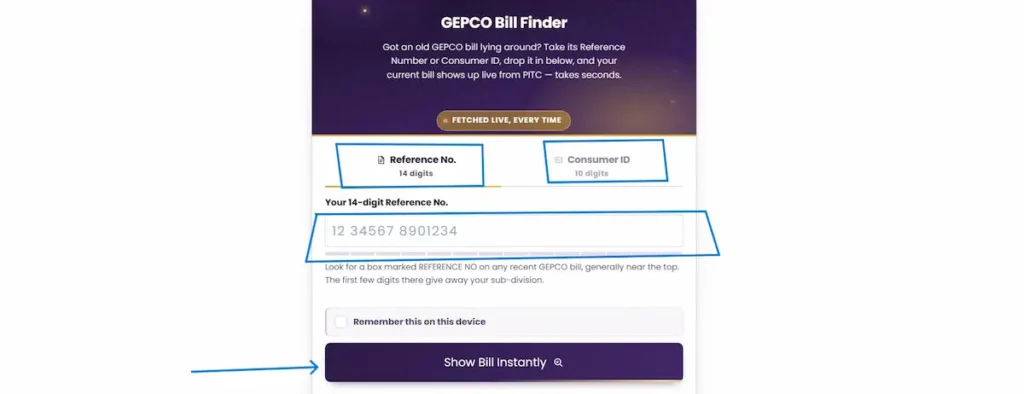
Got an old GEPCO bill lying around? Take its Reference Number or Consumer ID, drop it in below, and your current bill shows up live from PITC — takes seconds.
Fetched Live, Every TimeHow to check your GEPCO bill online
Checking your Gujranwala electricity bill here takes under a minute:
- Pick how you want to search. Use the Reference No. (14 digits) tab if you have a recent bill, or switch to the Consumer ID (10 digits) tab if that’s the number you have on hand.
- Type your number in. Spaces are fine — you don’t need to add dashes or the letter at the end (the U or R). Just the digits.
- Tick “Remember this on this device” if you want next month to be a single tap. Skip it on a shared or public device.
- Press “Show Bill Instantly.”
- Your live bill opens from the official PITC page. From there you can read it on screen, or use your browser’s print option to save it as a PDF.
All the checker does is forward your number to PITC’s live bill page and show your current record — it doesn’t change anything and it doesn’t keep your data.
Where to find your reference number and consumer ID
Both numbers sit in the consumer detail box near the top-right of every GEPCO bill, each on its own labelled row:
- Reference No. — 14 digits. This is the main number for checking your bill. The opening digits tie your connection to its sub-division, and some bills print a letter at the very end (U for urban, R for rural). You don’t need that letter when you check online — just the 14 digits.
- Consumer ID — 10 digits. Printed just below the reference number. It’s the backup way in when your paper bill is faded or torn and you can’t read all 14 digits clearly.
Keep one old bill photographed on your phone and you’ll always have both numbers ready.
Understand your GEPCO bill — every field explained
Your bill looks crowded, but it’s just a few groups of information. Here’s what each part means, top to bottom.
Consumer detail (who and where you are on the network):
- Reference No. / Consumer ID — your two connection identifiers (see above).
- Name & Address — the registered account holder and premises.
- Transformer / Feeder / Sub-Division — the exact point on GEPCO’s network your supply comes from; useful when you report a local fault or complaint.
- Category — whether you’re a Protected or Unprotected consumer, which decides your per-unit rate (explained in the tariff section below).
- Status — your meter-reading state for the month. Pro-Rata Consumption means the meter was read mid-cycle rather than on the usual date, so you’re billed for a partial period; any units not yet billed show as Outstanding Units and roll into next month.
- Tariff Category / Tariff — your rate class, such as Domestic (A-1A) for a standard home.
- Sanctioned Load — the maximum load approved for your connection, in kW.
- Curr MDI — the maximum demand recorded for the month, which matters mainly for larger and commercial connections.
Meter info (how your units were worked out):
- Meter No., MF, Previous Reading, Present Reading, Units. Your billed units are calculated as (Present Reading − Previous Reading) × MF, where MF (multiplier factor) is usually 1 on a standard home meter. If you see a “Pro-Rata based present reading” line, it means the reading date fell mid-month, as above.
Dates and what you pay:
- Bill Month, Reading Date, Issue Date, Due Date — your billing cycle at a glance.
- Payable Within Due Date vs Payable After Due Date — pay by the due date for the lower amount. Miss it and the higher figure applies, which includes the L.P. Surcharge (late-payment surcharge).
Bill charges breakdown: the rupee lines that make up your total — Total Electricity Charges, Subsidies (any relief applied), Arrears (past dues carried forward, or a credit if negative) and Installment (if a large amount was split). Each is explained in the charges section below.
Bill history: a rolling 12-month table of month, status, units, bill and payment. It’s the fastest way to spot a usage spike or confirm a past month — the reliable check is simply whether the Payment figure matches the Bill figure for that month. The Status column uses short billing codes; treat the units and payment columns as your source of truth for what was actually charged and paid.
On the bill also: a QR code and barcode for fast payment at bank counters and in mobile apps, and a line for the government’s energy-efficient fan programme at efan.gov.pk.
Can I check my GEPCO bill with my CNIC?
No — a GEPCO bill can’t be pulled up by CNIC alone. The billing system finds your bill by reference number or consumer ID, not by identity card, so there’s no CNIC field on the official bill page or in this checker.
Your CNIC is still used elsewhere in the GEPCO process — when you apply for a new connection, and when you register your mobile number for SMS bill alerts. If you’ve lost both your numbers, you can recover your reference number from any older bill, from a bank or mobile-wallet payment record (it’s saved as your biller ID), or by visiting your sub-division office with your CNIC and address.
About the official PITC portal (bill.pitc.com.pk)
It helps to know who does what. GEPCO distributes the electricity and issues your account. PITC — the Power Information Technology Company — runs the central billing system that generates and hosts every DISCO’s online bill, GEPCO’s included, at bill.pitc.com.pk. When you check your bill here, you’re being taken to that official PITC record.
To be clear about what this site is: it’s an independent shortcut to your official bill. We’re not GEPCO, PITC, WAPDA or NEPRA, and we don’t generate the bill ourselves — we simply open the official one for you.
Download, print and save your duplicate bill
A duplicate bill is just a fresh copy of your original — same amount, same due date, same reference number — handy when the paper bill arrives late, gets lost or tears.
Once your bill opens:
- Use your browser’s print option (or the print icon on the bill page).
- Choose Save as PDF to keep a copy, or send it to a printer.
Banks, mobile wallets and payment counters accept this downloaded copy, so a saved PDF is all you need to pay.
Check your bill history and previous months
You don’t need a separate lookup to see past bills. Every bill you open here carries the 12-month history table described above, so your recent units, billed amounts and payments are all on one page.
Reading it is straightforward: scan the Units column to see how your usage moved month to month — a sudden jump usually points to hotter-weather load or a possible meter issue worth checking — and compare each month’s Payment figure against its Bill figure to confirm it was cleared. A zero-unit month with an adjustment is normal after a correction or a pro-rata reading.
GEPCO tariff and unit rates
GEPCO doesn’t set its own prices. Like every distribution company in the country, it applies the uniform national tariff approved by NEPRA (the National Electric Power Regulatory Authority), under the current FY 2025–26 determination. That’s why a home in Gujranwala pays the same base rate as one in Faisalabad or Multan.
A few things decide what you actually pay per unit:
- Protected vs unprotected. You’re a protected consumer if you’ve stayed at 200 units or below for the last six straight months, which earns a much lower rate. Cross 200 units and you move to the unprotected rate, and you stay there for the next six months even if your usage drops back below 200.
- Slab billing on total consumption. Above the protected threshold, Pakistan charges your entire month’s usage at the slab you land in — not each slab separately. So 210 units are all billed at the 201–300 rate, which is exactly why staying just under a slab line saves real money. The GEPCO bill calculator shows which slab your units land in before the meter is read.
- Time of Use (TOU) for three-phase and larger loads: usage in peak evening hours costs more than off-peak, so shifting heavy appliances to off-peak lowers the bill.
- Commercial connections follow their own schedule, separate from home slabs.
Because NEPRA revises these rates and adjustments periodically, the exact per-unit rate for your slab is printed on your own bill and is always the current authority for what you owe — open your bill above to see the rate applied to you this month.
Every charge and tax on your bill, explained
Your total is never just units × rate. These lines are added on top, and each is set by NEPRA or the government — not by GEPCO locally:
- Fuel Price Adjustment (FPA/FCA) — a monthly adjustment for the actual cost of fuel used to generate power. It can be positive or negative, so it can raise or lower your bill.
- Quarterly Tariff Adjustment (QTA) — a periodic adjustment applied for a set quarter; sometimes it’s a charge, sometimes relief.
- Fixed Charges — a monthly charge based on your connection type and slab, applied even when adjustments reduce your unit rate.
- Electricity Duty — a Punjab provincial duty. Its collection through electricity bills was discontinued from July 2025, and Punjab has since legislated it only for industrial and commercial connections above 500 kVA, with all domestic consumers exempt.
- General Sales Tax (GST) — the federal sales tax on electricity, 18%, collected on behalf of the FBR.
- Financing Cost / other surcharges — per-unit surcharges tied to power-sector financing.
- TV Fee — abolished. The Rs. 35 monthly PTV licence fee was removed from electricity bills from July 2025, so it should not appear on a current bill.
- Arrears — unpaid past dues carried forward. A negative arrear is good news — it’s a credit from an earlier overpayment, and it’s deducted from what you owe.
- L.P. Surcharge — the late-payment surcharge added if you pay after the due date.
The safest habit: read these off your own bill’s printed lines rather than assuming a fixed figure, because the adjustments change every cycle.
How to pay your GEPCO bill
Once you have your bill (or just your reference number), you can pay several ways:
- Bank counter, ATM or internet banking — add GEPCO as a biller and enter your reference number.
- Mobile wallets — JazzCash and Easypaisa — choose electricity/utility bills, select GEPCO, enter your number.
- NADRA e-Sahulat agents.
- QR code on the bill — scan and pay in a supporting banking app.
A practical trade-off: apps are the fastest but may add a small convenience fee, while a bank counter is usually free but slower — for a large monthly bill, that difference adds up over a year. Whichever you use, keep the receipt or screenshot; it’s the quickest proof of payment if a bill briefly shows unpaid due to a processing delay.
Complaints, overbilling and helpline
If something’s wrong — a wrong amount, a faulty meter, or an outage — here’s the working order to raise it:
- Helpline 118 — the round-the-clock power complaint line; you can also send an SMS to 8118.
- CCMS online complaint system — for billing, meter and supply complaints you want on record.
- NEPRA’s Asaan Approach app — the regulator-level escalation, referenced on your bill, for when GEPCO doesn’t resolve the issue in reasonable time.
One tip that genuinely speeds things up: file with specifics — the exact units, the amount charged, and how it compares to a normal past month. A complaint that says “my bill is wrong” bounces back for details; one with the numbers attached gets actioned fast.
Areas GEPCO serves
Gujranwala Electric Power Company supplies electricity across the Gujranwala region of upper Punjab. Its area covers seven districts: Gujranwala, Sialkot, Gujrat, Hafizabad, Narowal, Mandi Bahauddin and Wazirabad.
One detail worth getting right, because most bill-checking sites still miss it: Wazirabad was carved out of Gujranwala District and notified as a separate district, and it remains inside GEPCO’s supply area. So if your connection is in Wazirabad, GEPCO is still your distributor and your bill works exactly the same way.
This is also one of Pakistan’s industrial heartlands — Sialkot’s surgical-instrument, sportswear and leather exporters, and the manufacturing base across Gujranwala and Gujrat — which is why a large share of GEPCO connections are commercial and industrial, not just households.
Solar, net metering, and lowering your bill
Net metering lets a solar-equipped home or business export surplus daytime power back to the GEPCO grid and earn credit for it. During the day your panels cover your usage and send the extra out; at night you draw from the grid, and the credit you built up offsets that draw. It pays off best when you have real daytime consumption — air conditioning, pumps, machinery — rather than a mostly-evening load.
For the region’s exporters and workshops, where daytime demand is heavy and steady, a grid-tied solar setup can take a meaningful bite out of the monthly bill over time. The application and buy-back terms are worth understanding properly before you invest.
A few habits that lower any GEPCO bill without new hardware:
- Track units, not rupees. The rupee total shifts with taxes and adjustments; your units show your real usage and whether it’s creeping up.
- Shift heavy loads off peak hours. On time-of-use meters, running heavy appliances outside the evening peak costs less per unit.
- Use the SMS meter-reading service. Send your reference number to GEPCO’s reading service to see your recorded units before the bill is printed — it catches a wrong or unusually high reading while you can still query it.
GEPCO privatization 2026 — what bill-payers should know
GEPCO is part of the first batch of Pakistan’s electricity distribution-company privatization, alongside FESCO (Faisalabad) and IESCO (Islamabad). The government, through the Privatization Commission, is offering 51% to 100% shareholding along with management control to private investors, as part of power-sector reforms tied to the country’s IMF commitments.
Where it stands right now: the process is at the early Expression of Interest (EOI) stage. The Privatization Commission extended the EOI deadline for GEPCO to August 21, 2026, with the actual bidding and sale process expected to move forward later in 2026.
The question most consumers ask is whether this changes their bill or connection. As things stand, it does not — yet. GEPCO continues to operate normally, tariffs are still set by NEPRA (not by GEPCO or any buyer), and your reference number, bill and payment methods are unaffected while the process runs. If ownership changes, day-to-day billing is expected to continue under NEPRA regulation.
Frequently asked questions
How do I check my GEPCO bill by reference number?
Enter the 14-digit reference number from any recent bill into the checker at the top of this page and press Show Bill Instantly. Your current bill opens from the official PITC record, ready to view or download.
Can I check my GEPCO bill with my consumer ID instead?
Yes. Switch to the Consumer ID tab and enter your 10-digit consumer ID. It’s the reliable backup when your paper bill is faded and you can’t read all 14 digits of the reference number.
Can I check my GEPCO bill by CNIC?
No. GEPCO bills are found by reference number or consumer ID, not by CNIC. Your CNIC is used for new connections and for registering your mobile number for SMS alerts, not for looking up a bill.
Why does my bill show “not found”?
Almost always a typing issue. Recheck every digit, and make sure you’re on the right tab — a 14-digit number goes in the Reference No. field, a 10-digit number in the Consumer ID field. Don’t add the trailing U or R.
How do I get a duplicate GEPCO bill?
Check your bill above, then use your browser’s print option and choose Save as PDF. A duplicate is a fresh copy of the original with the same amount and due date, accepted at banks and in payment apps.
How do I see my previous months’ bills?
Every bill you open here includes a rolling 12-month history table showing each month’s units, billed amount and payment — so you can review past usage or confirm a payment without a separate lookup.
What does one GEPCO unit cost?
There’s no single figure — the rate rises by slab. For domestic users it runs from roughly Rs 4 per unit at the lowest lifeline slab to around Rs 47–48 at the highest slab above 700 units, before taxes and monthly adjustments. The exact rate for your slab is printed on your bill.
How do I pay my GEPCO bill online?
Use JazzCash, Easypaisa, your bank’s app or internet banking, NADRA e-Sahulat, or scan the QR code on your bill. Select electricity/utility bills, choose GEPCO, and enter your reference number. Keep the receipt as proof.
My bill looks too high — what should I do?
First check your units against the history table and your meter reading. If it still looks wrong, file a complaint on helpline 118 or the CCMS system with your exact units and amount, and escalate to NEPRA’s Asaan Approach app if it isn’t resolved.