MEPCO Bill Check Online 2026 – View & Download Duplicate Bill
To check your MEPCO bill online, enter your 14-digit reference number or 10-digit consumer ID into the search tool below and click View Bill. Your current electricity statement opens directly from official Power Information Technology Company (PITC) servers, ready to view, print, or download as a PDF copy.

Check Your MEPCO Bill
Enter the Reference Number or Consumer ID printed on a past bill and your latest MEPCO bill opens directly from PITC.
Direct from PITC- Look for the CONSUMER DETAIL box near the top-left corner of an older MEPCO bill, right above your name and address.
- REFERENCE NO is the 14-digit figure on the top line of that box. It is tied to the meter, not to you personally, and its first two digits mark your sub-division.
- CONSUMER ID is the 10-digit figure just underneath it. Since both numbers lead to the same bill, pick whichever one you can read most clearly.
- Enter numbers only — spacing is added automatically. PITC does not support a CNIC or name lookup, so a CNIC will not pull up a bill here; it is only useful when a MEPCO office is helping you recover a lost reference number in person.
How to Check Your MEPCO Bill Online (Step-by-Step)
Retrieving your monthly duplicate bill takes less than a minute. The tool connects directly with the central PITC database to fetch the exact same copy delivered to your home.
Step 1 – Select Reference Number or Consumer ID Tab
The search tool provides two lookup options:
- Reference No (14 Digits): The standard choice for domestic residential users. This 14-digit code is tied directly to your physical electric meter and local sub-division.
- Consumer ID (10 Digits): A permanent 10-digit account identifier. If you manage rental properties, shops, or multiple meters, using the Consumer ID ensures you always pull the correct bill even if a physical meter is replaced.

Step 2 – Enter Your Number (With Automatic Formatting)
Type your numerical code into the input field. Enter digits only—you do not need to type spaces or dashes. The field formats your input automatically (e.g., 11 15243 0996922).
- Length Indicator: A live counter on the right side confirms when you reach the required 14 or 10 digits.
- Device Storage Switch: Turn on the “Save this number on this device for next time” toggle. This saves your reference number in your browser’s local storage (
localStorage). When you return next month, your number loads automatically without storing personal data on external web servers.
Step 3 – Click “View Bill” & Access the Official PITC Document
Click the purple View Bill → button. The tool queries the PITC Duplicate Bills Portal and opens your complete monthly statement.

- Print or Save as PDF: Use the print icon on the top right of the bill screen to generate a high-resolution PDF or send it straight to a printer. This copy includes the official barcode and is fully accepted for payment at all banks and post offices.
- Troubleshooting: If your statement does not appear after clicking the button, check the top bar of your mobile browser and allow pop-ups for this site. Also confirm that your 14-digit number matches an older paper bill.
Locating Your Reference Number and Consumer ID on a Paper Bill
Every physical MEPCO electricity bill displays an account identification section in the upper-left corner, positioned directly above your name and address.
+------------------------------------------------------------------------------------+
|                                MEPCO CONSUMER DETAIL                               |
| REFERENCE NO:  [ 11 ]   [ 15243 ]    [ 0392922 ]    [ U / R ]                      |
|                └─Sub-Div └─Batch No.  └─Consumer No. └─Tariff / R (Rural/Urban)    |
|                                                                                    |
| CONSUMER ID:   [ 1156105989 ]  (10-Digit Permanent Premises ID)                    |
+------------------------------------------------------------------------------------+
The 14-Digit Reference Number Structure
The reference number contains four distinct administrative components:
- Sub-Division Code (First 2 Digits): Identifies your local MEPCO sub-division office (for example,
11represents Kot Mithan). - Batch Number (Next 5 Digits): Represents your billing batch and meter route (
15243). - Consumer Number (Next 7 Digits): Your specific account index within that route (
0392922). - Tariff / Area Suffix (Final Letter): Indicates whether the connection is classified as Rural (
R) or Urban (U).
The 10-Digit Consumer ID
The Consumer ID sits on the line directly beneath the reference number. While a reference number can occasionally change if your local distribution line or meter is upgraded, the 10-digit Consumer ID remains permanently attached to the physical property.

Lost Your MEPCO Bill? 5 Ways to Recover Your Reference Number
The central PITC database server accepts only 14-digit reference numbers or 10-digit consumer IDs. It does not support online searches using CNIC numbers, customer names, or meter serial numbers. Websites claiming to offer CNIC-based electricity bill checks are inaccurate and cannot pull official billing records.
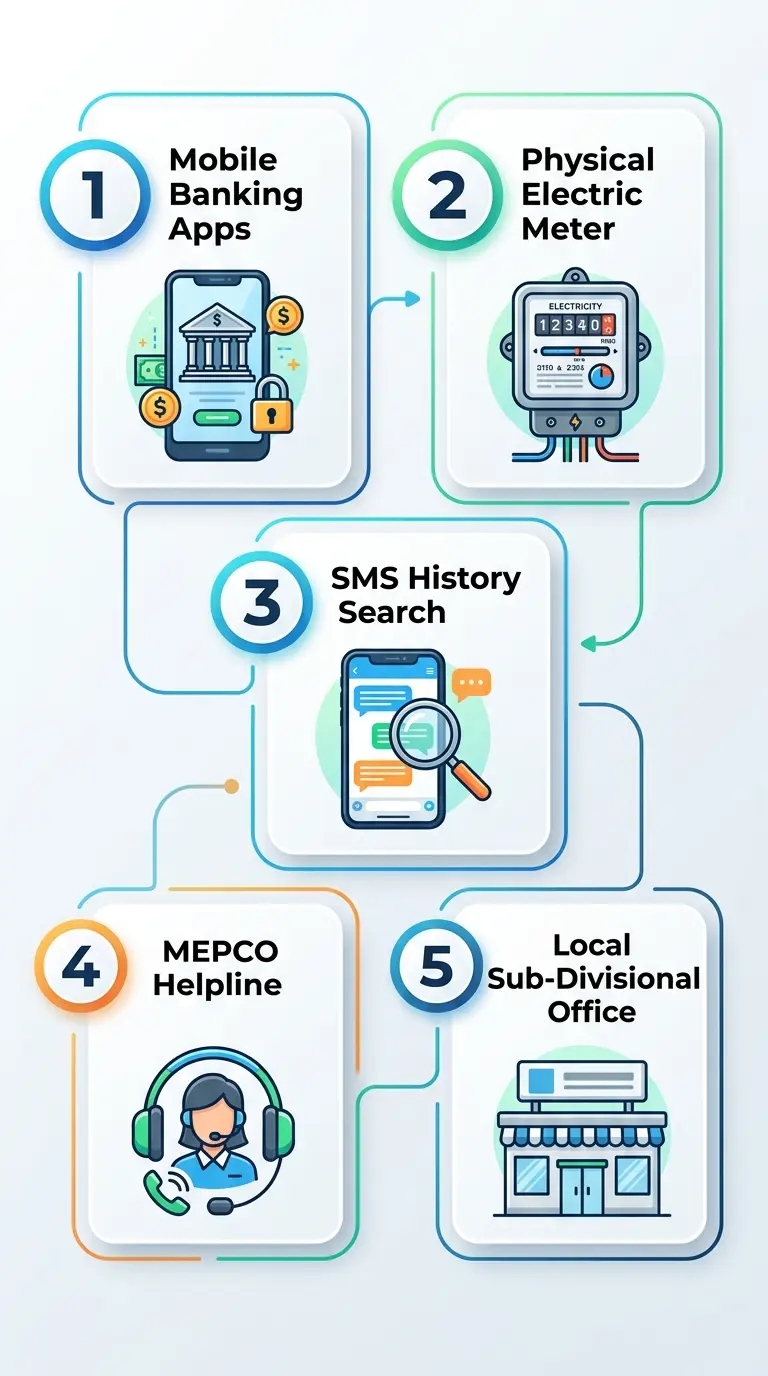
If you have misplaced your paper bill, use these 5 verified methods to retrieve your reference number:
- Digital Wallet & Mobile Banking Receipts: If you previously paid your electricity bill using JazzCash, EasyPaisa, SadaPay, NayaPay, or Allied Bank myABL, open your app’s transaction history. Every digital utility receipt stores the 14-digit reference number permanently.
- Physical Meter Badge Inspection: Inspect the metal or printed label on your physical electric meter. Take note of the meter serial number and sanctioned load, which local MEPCO office staff can use to locate your account file.
- SMS History Search: Search your mobile message inbox for texts from shortcodes
8118or8334. Previous monthly bill alerts or bank payment confirmations include your reference number. - MEPCO Toll-Free Helpline: Call the customer service center at 0800-63726. Provide the representative with your registered CNIC, meter serial number, and exact home address to look up your account details in the internal customer index.
- Visit Your Local Sub-Divisional Office: Go to your local MEPCO sub-division customer service desk with your original CNIC and property ownership documents (or a rental agreement). The revenue officer can print your account ledger immediately.
Understanding Your MEPCO Electricity Bill (Line-by-Line Breakdown)
An official MEPCO bill contains multiple operational, technical, and financial figures. Understanding how these line items work helps you track monthly energy usage and verify that your meter reading matches your printed statement.
+-----------------------------------------------------------------------------------+
|  CONSUMER DETAIL       |  METER INFO             |  BILL CHARGES (RS.)            |
|  • Ref: 11152430392922 |  • Meter: S-P 3189972   |  • Total Charges:  Rs. 2,248   |
|  • Con ID: 1156105989  |  • Prev Reading: 2066   |  • Subsidies:      Rs. 1,154   |
|  • Feeder: Kot Mithan  |  • Present Read: 2122   |  • Arrears:        Rs. 0       |
|  • Category: Protected |  • Units Billed: 56     |  • Within Due Date:Rs. 1,094   |
|  • Status: Pro-Rata    |  • Reading: Pro-Rata    |  • Late Surcharge: Rs. 45      |
|  • Tariff: A-1A(01)    |  • Sanctioned Load: 2KW |  • After Due Date: Rs. 1,139   |
+-----------------------------------------------------------------------------------+
Consumer Detail & Feeder Information
- Transformer & Feeder Code: Identifies the specific local distribution line and high-voltage transformer powering your neighborhood (e.g.,
Transformer: Basti Kallar 02,Feeder: 035402 Kot Mithan). Load management schedules are applied directly at the feeder level. - Sub-Division: The administrative office responsible for your meter maintenance, line repairs, and billing adjustments.
- Sanctioned Load: The maximum electrical load (in kilowatts) approved for your connection (e.g.,
2 kW). Consistently drawing more power than your sanctioned limit can lead to system penalties or require a mandatory load extension.
Meter Reading & Pro-Rata Consumption Rules
- Previous vs. Present Reading: Shows the units recorded between two billing dates. Subtracting the previous reading from the present reading gives your consumed units (for example:
2122 - 2066 = 56 units). - Pro-Rata Billing Mechanism: Under NEPRA regulations, a standard billing cycle spans 30 days. If a meter reader takes readings earlier (e.g., after 28 days) or later (e.g., after 33 days), MEPCO applies a pro-rata adjustment. This normalizes consumption against a 30-day baseline, preventing users from crossing into higher tariff tiers due to delayed meter reading routes.
- Meter Photo Verification: Modern bills include a timestamped photograph of your physical meter display taken during the meter reader’s visit, allowing you to cross-check the recorded digits against your actual meter dial.
Tariff Classifications: Protected vs. Non-Protected Consumers
NEPRA divides residential electricity connections (Tariff A-1a) into three distinct billing groups:
- Protected Consumers (Subsidized): Domestic households that consume 200 units or fewer per month for six consecutive billing cycles. These accounts receive government subsidies on base tariffs.
- Non-Protected Consumers: Any domestic account that exceeds 200 units in a single billing month. Exceeding this threshold removes the protected status for the next six consecutive months, subjecting the account to higher baseline rates even if consumption drops back below 200 units in subsequent months.
- Lifeline Consumers: A special relief category for low-income households consuming up to 50 or 100 units per month, billed at heavily subsidized flat rates.
Payment Deadlines & Staggered Late Payment Surcharges (LPS)
- Payable Within Due Date: The net payable amount after deducting applicable government subsidies (e.g.,
Total Charges: Rs. 2,248 - Subsidies: Rs. 1,154 = Rs. 1,094). - Late Payment Surcharge (L.P. Surcharge): A mandatory penalty added if payment is made after the printed due date (typically
Rs. 45toRs. 90on domestic bills). - Tiered Payment Deadlines: Modern bills feature staggered late payment windows (for example:
Payable till 07-Aug: Rs. 1,139vs.Payable after 07-Aug: Rs. 1,184).
MEPCO Bill Taxes and Surcharges Explained
In addition to base electricity rates, utility bills in Pakistan include surcharges, adjustments, and taxes approved by NEPRA and the federal government.
| Surcharge / Code | Full Name | Calculation Basis & Purpose |
| FPA / FCA | Fuel Price Adjustment | A monthly variable adjustment accounting for changes in fuel prices (crude oil, natural gas, imported coal) used to generate electricity compared to NEPRA’s annual reference cost. |
| TR Surcharge | Tariff Rationalization Surcharge | Balances the difference between NEPRA’s determined cost of service and the uniform consumer tariff notified by the Government of Pakistan across all DISCOs. |
| FC Surcharge | Financing Cost Surcharge | A fixed fee (currently Rs. 3.23 per unit) collected across non-lifeline categories to service power sector debt. |
| QTR / QTA | Quarterly Tariff Adjustment | Evaluated every three months to reflect power generation capacity costs, system transmission losses, and exchange rate movements. |
| GST & Further Tax | General Sales Tax | Standard federal sales tax levied on base electricity charges and monthly fuel adjustments. |
| Deferred Amount | موخر شدہ رقم | Outstanding bill amounts officially converted into monthly installments by MEPCO, billed without late penalty interest. |
| Abolished Charges | PTV Fee & Electricity Duty | The Rs. 35 monthly PTV fee and provincial electricity duties have been discontinued under federal directives. If these appear on a current bill, lodge a formal dispute via the CCMS portal. |
MEPCO Residential Tariff Slab Structure
The MEPCO bill calculator estimates your upcoming bill from the rates below, which helps you monitor appliance usage and stay within lower tariff brackets.
Residential Tariff Slabs (Category A-1a)
Domestic rates follow a progressive tiered structure where higher usage tiers carry higher per-unit rates:
| Consumption Tier (Units / Month) | Consumer Classification | Billing Structure |
| 01 – 50 Units | Lifeline Domestic | Flat Subsidized Rate |
| 51 – 100 Units | Lifeline / Protected | Subsidized Base Rate |
| 101 – 200 Units | Protected (6-Month Rolling) | Subsidized Base Rate |
| 201 – 300 Units | Non-Protected Tier 1 | Standard Progressive Slab |
| 301 – 700+ Units | Non-Protected Upper Tiers | Peak Commercial-Scale Slabs |
MEPCO Peak Electricity Hours Schedule
For connections equipped with digital Time-of-Use (ToU) or Time-of-Day (TOD) 3-phase meters, electricity drawn during peak evening hours is billed at a higher per-unit tariff.
+-------------------------------------------------------------------+
|  SEASON                      |  PEAK HOURS WINDOW (4 HOURS DAILY) |
|  December to February        |  5:00 PM – 9:00 PM                 |
|  March to May                |  6:00 PM – 10:00 PM                |
|  June to August              |  7:00 PM – 11:00 PM                |
|  September to November       |  6:00 PM – 10:00 PM                |
+-------------------------------------------------------------------+
Actionable Load-Shifting Steps to Reduce Your Bill
- Avoid Heavy Motors During Peak Hours: Turn off water pumps, washing machines, electric geysers, and irons during the designated 4-hour peak window.
- Optimize Air Conditioner Settings: Set inverter air conditioners to 26°C. Running an inverter AC at 26°C rather than 18°C lowers compressor workload and reduces electricity consumption by up to 25%.
- Track the 200-Unit Boundary: Check your meter reading around the 20th of each month. Keeping your monthly consumption under 200 units protects your subsidized status for the following six months.
Solar Net Metering (Bi-Directional Green Meter) Billing
Properties with approved rooftop solar systems utilize bi-directional meters to exchange power with the MEPCO distribution network.
- Export vs. Import Units:
- Export (KWh): Units generated by solar panels and pushed into the MEPCO grid during daylight hours.
- Import (KWh): Units drawn from the MEPCO grid at night or when household load exceeds solar production.
- Credit Settlement & Rollover: At the end of each billing cycle, Export units are subtracted from Import units. If your solar system exports more power than you consume, the surplus units convert into a monetary balance that rolls over to offset future electricity bills.
How to Pay Your MEPCO Bill Online Safely
You can pay your duplicate or original MEPCO bill through official digital banking networks, mobile wallets, or in person without transaction fees.
                          [ MEPCO Payment Options ]
                                      |
     +-----------------+--------------+---------------+-----------------+
     |                 |                              |                 |
[Digital Wallets]  [Online Banking]            [Raast Instant QR]    [Physical Counters]
• JazzCash         • Allied Bank (myABL)       • Scan bill QR code   • Commercial Banks
• EasyPaisa        • HBL / Meezan / UBL        • Instant bank link   • Pakistan Post
• SadaPay/NayaPay  • 1Link ATM Network         • Zero extra fee      • NADRA e-Sahulat
1. Mobile Wallets (JazzCash, EasyPaisa, SadaPay, NayaPay)
- Open your digital wallet app.
- Select Bill Payment or Utilities and choose Electricity.
- Select MEPCO as your company.
- Enter your 14-digit reference number (without spaces).
- Verify that the displayed consumer name and payable amount match your bill.
- Confirm payment using your secret MPIN or biometric fingerprint.
2. Commercial Banking Apps & 1Link
Log into your mobile banking app (such as Allied Bank myABL, HBL Mobile, Meezan Bank, or UBL Digital). Navigate to Utility Bill Payment, select MEPCO, enter your 14-digit reference number, and authorize the transfer via One-Time Password (OTP).
3. Raast Instant QR Code Payment
Modern MEPCO bills include a Raast QR Code in the top-right corner. Open any banking app that supports Raast QR payments, scan the printed code on your screen or paper bill, and confirm the instant settlement.
4. Over-the-Counter Collection Points
You can print a duplicate bill copy from this site and present it at any commercial bank branch, Pakistan Post office counter, or authorized NADRA e-Sahulat franchise to pay in cash.
Payment Verification Checklist
- Double-Check Biller Name: Confirm that the biller is listed specifically as MEPCO (Multan Electric Power Company).
- Save Confirmation Receipts: Download or screenshot the payment receipt showing the transaction ID.
- Settlement Timing: While bank clearing is instant, PITC database servers can take 24 to 48 hours to update the online status. Your digital payment receipt serves as legal proof of timely payment.
How to Correct Billing Errors & File a MEPCO Complaint Online
If your bill contains a misread meter digit, incorrect tariff category, or unexplained surcharge, you can file a formal complaint online to request an amended bill.
Filing a Complaint on the CCMS Portal
The Power Information Technology Company (PITC), under the Ministry of Energy (Power Division), operates the centralized Customer Complaint Management System (CCMS) for Pakistan’s ex-WAPDA power distribution companies.
- Photograph Your Meter: Take a clear, well-lit photograph of the digital LCD display on your electric meter showing the current cumulative kilowatt-hour (kWh) reading and the meter serial number.
- Access the Portal: Open the official Customer Complaint Management System (CCMS).
- Submit Verification: Enter your 14-digit reference number and active mobile phone number to receive a One-Time Password (OTP) via SMS.
- Register Complaint Details: Select Billing Complaint / Wrong Reading, enter the actual reading from your photo, upload the image as proof, and submit the form.
- Track Your Ticket ID: Save the generated Complaint Tracking Number to monitor your resolution status online or follow up with your local sub-division.
Statutory Escalation to NEPRA & Federal Ombudsman (Wafaqi Mohtasib)
Under the NEPRA Consumer Service Manual, your local MEPCO sub-division must resolve billing disputes within 7 to 14 business days.
If the local office fails to correct an unjustified charge or issues an unverified detection bill, you have the legal right to escalate the matter:
- Federal Ombudsman (Wafaqi Mohtasib): File a free administrative complaint online against MEPCO. No lawyer is needed; the Ombudsman reviews utility overbilling cases directly and issues binding directives to power companies.
- NEPRA Consumer Affairs Division: Submit an appeal along with your CCMS ticket history and meter photographs directly to the regulatory authority for formal investigation.
MEPCO Regional Circle Helpline Directory
If you experience localized power outages, unscheduled load shedding, or transformer faults, contact your regional circle customer complaint center directly.
| Operational Circle | Districts Covered | Circle Office Contact Number |
| Multan Circle | Multan District | 061-9220258 / 061-9220198 |
| Khanewal Circle | Khanewal District | 065-2502411 |
| Vehari Circle | Vehari, Burewala | 067-9201109 / 067-3360282 |
| Sahiwal Circle | Sahiwal, Pakpattan | 040-9330303 / 040-9200305 |
| Bahawalpur Circle | Bahawalpur, Lodhran | 062-9250109 / 062-9250102 |
| Bahawalnagar Circle | Bahawalnagar, Chishtian | 063-9240040 / 063-9239031 |
| Rahim Yar Khan Circle | Rahim Yar Khan, Sadiqabad | 068-9230158 / 068-9230160 |
| D.G. Khan Circle | Dera Ghazi Khan, Rajanpur | 064-9260229 / 064-9239229 |
| Muzaffargarh Circle | Muzaffargarh, Layyah | 066-9200064 / 066-9200065 |
| Headquarters Helpline | All South Punjab (Toll-Free) | 0800-63726 / 118 (Emergency) |
| SMS Bill Query | All Pakistan DISCOs | Text PITC <14-Digit Ref> to 8334 or 8118 |
Frequently Asked Questions About MEPCO Bills
How can I check my MEPCO bill online?
Enter your 14-digit Reference Number or 10-digit Consumer ID in the search box above and click View Bill. Your latest duplicate bill opens directly from official PITC servers, ready to view, print, or download as a PDF.
Can I check my MEPCO bill online using my CNIC number?
No. The central PITC billing database accepts only 14-digit reference numbers or 10-digit consumer IDs. Online searches using a CNIC, customer name, or meter number are not supported.
What is the difference between a Reference Number and a Consumer ID?
A 14-digit Reference Number identifies the physical meter connection and local sub-division code. A 10-digit Consumer ID is a permanent customer account identifier assigned to the property that remains unchanged even if the meter is replaced.
Is an online duplicate MEPCO bill valid for bank payment?
Yes. A printed duplicate bill carries the exact same barcode, reference number, due date, and payable amount as the paper bill delivered by mail. It is fully accepted at all commercial banks, post offices, and digital payment apps.
How do I qualify as a Protected Consumer in MEPCO?
Domestic consumers who consume 200 units or fewer per month for six consecutive billing cycles qualify for subsidized Protected tariff rates. Exceeding 200 units in any single month reclassifies the account to Non-Protected status for six months.
How can I check my MEPCO bill via mobile SMS?
Open your mobile messaging app, type PITC followed by a space and your 14-digit reference number (for example: PITC 11152430392922), and send the SMS to shortcode 8334 or 8118.
What should I do if “Bill Not Found” appears?
Check that all 14 digits are entered correctly without spaces or dashes. If you are entering a 10-digit number, ensure the Consumer ID tab is selected. For a new MEPCO connection, the first bill takes 2 to 3 months to appear in the system.
How do I check if my MEPCO bill is paid?
Check your digital wallet or mobile banking app transaction history for the payment confirmation receipt. Alternatively, check next month’s bill: if the Arrears line displays zero, your previous payment was successfully credited.
Independent Informational Disclaimer
This website is an independent utility helper designed to assist consumers in checking and downloading public electricity billing statements served directly by the official PITC Duplicate Bills Portal.
We are not affiliated with, endorsed by, or connected to Multan Electric Power Company (MEPCO), the Water and Power Development Authority (WAPDA), the Power Information Technology Company (PITC), the National Electric Power Regulatory Authority (NEPRA), or the Government of Pakistan. We do not collect utility payments, modify billing records, or store customer account numbers on our web servers. All queries communicate directly with official public database endpoints.