FESCO Bill Online Check 2026 – View & Download Duplicate Bill
Check your FESCO bill online by entering the 14-digit Reference Number, or the 10-digit Consumer ID, printed on any earlier bill. Your latest bill from Faisalabad Electric Supply Company opens on the official PITC portal, free and without any login, showing your current amount, due date and units used. From there you can download or print a duplicate bill for your own records or to pay at a bank.

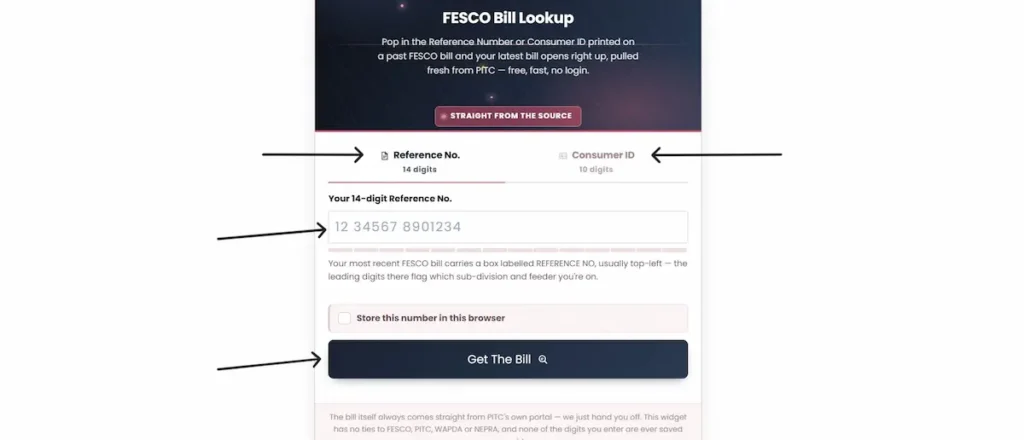
FESCO Bill Lookup
Pop in the Reference Number or Consumer ID printed on a past FESCO bill and your latest bill opens right up, pulled fresh from PITC — free, fast, no login.
Straight From The SourceHow to check your FESCO bill online
- Take out any past FESCO bill and find the 14-digit Reference Number in the Consumer Detail box at the top left. If you would rather use the 10-digit Consumer ID, it sits in the same box.
- In the tool above, choose the tab that matches your number — Reference No. (14 digits) or Consumer ID (10 digits).
- Type the digits only. The counter below the field fills as you enter each one. Leave out spaces, dashes, and the U or R letter that appears at the end of the reference number.
- If you check the same connection every month, tick Store this number in this browser. It saves the number on your own device for next time, not on any server of ours.
- Press Get The Bill. The tool opens your bill on the official PITC portal in a new tab, where you will see the amount, due date, units consumed, meter reading dates, and your last 12 months of billing history.
- On that page, view the full bill, or download and print it by choosing Save as PDF.
The bill you see comes straight from PITC’s own system. It is the official record, not a copy we generate, and none of the digits you type are stored on our side.
Where to find your Reference Number and Consumer ID
The 14-digit Reference Number is printed in the Consumer Detail box at the top-left of your FESCO bill, and it appears again at the foot of the bill beside the barcode. Either copy works. The 10-digit Consumer ID sits in the same box, just below the Reference Number.
Do not confuse these with the Meter Number, which starts with letters and cannot open a bill online.
The Reference Number belongs to the connection, not the month, so it stays the same every cycle and on any duplicate. Its leading digits identify the sub-division and feeder your connection sits on, which is why any older bill for the same property will open your latest one.
Sample number: 12 34567 8901234
A few of the other fields in that box are worth knowing, because they matter when something goes wrong:
- Sub Division — the office that handles your meter, reading and complaints.
- Feeder and Transformer — the supply line your outage or voltage complaint is logged against.
- Category — Protected or Unprotected, which sets the slab rate you are billed at.
- Tariff Category and Tariff — your connection type, for example A-1A(01) for a standard domestic supply.
- Sanctioned Load — your approved load in kilowatts, which the fixed charges are based on.
Reading these out along with your Reference Number when you call the helpline gets your complaint to the right office faster.
Can you check a FESCO bill by CNIC?
No. FESCO’s billing system finds a connection by Reference Number or Consumer ID, not by CNIC, name, address or meter number. There is no official way to open a bill using only a CNIC.
If you have lost your number, here is how to get it back:
- Payment app history. If you have ever paid through JazzCash, EasyPaisa or a bank app, your Reference Number is saved in that payment record. This is the quickest route for most people.
- Any older bill. Because the number belongs to the connection, any past bill for the same property works — including one left behind by a previous tenant or owner.
- Register your CNIC. Link your CNIC and mobile number to the connection at mnr.pitc.com.pk. After that, your bill details reach you by SMS each month and you no longer depend on the printed copy arriving.
- Your sub-division office. Staff can trace the connection from your CNIC and the address on record. Take your original CNIC and a document that ties you to the property, such as ownership papers or a tenancy agreement.
How to download, print and save your duplicate bill
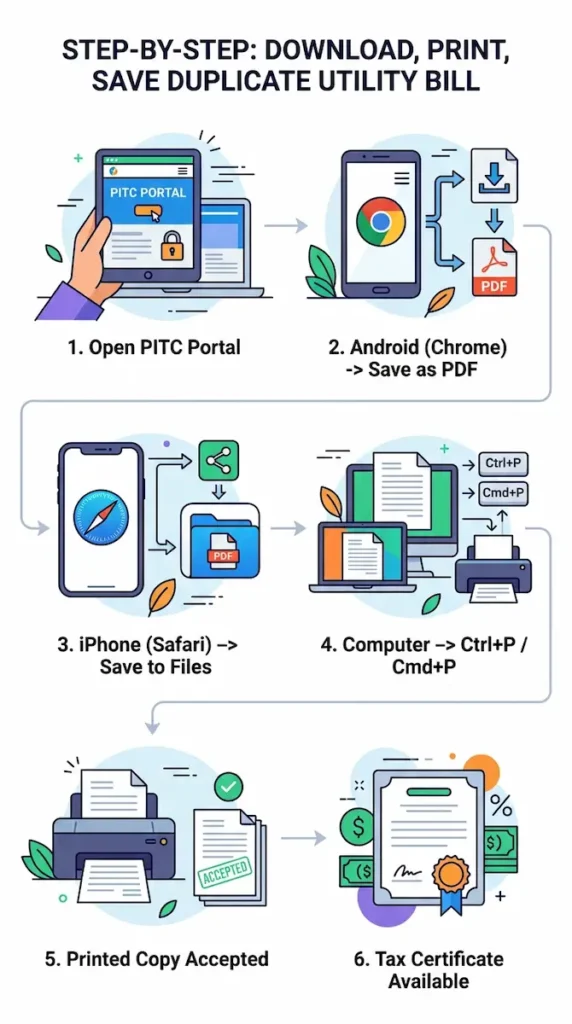
Once your bill opens on the PITC page, use your own device to save or print it:
- Android (Chrome): tap the menu, choose Print, then set the destination to Save as PDF.
- iPhone (Safari): tap Share, choose Options and select PDF, then Save to Files.
- Computer: press Ctrl+P, or Cmd+P on a Mac, and either print or choose Save as PDF.
A printed duplicate is accepted at bank counters, post offices and retail payment agents, because it carries the same Reference Number, amount and due date as the original. It is the same PITC record, not a separate document.
The portal also has a Tax Certificate tab, which gives filers a record of the income tax deducted on the connection over the year.
Save a PDF rather than a screenshot. It keeps the full page, prints cleanly, and is easier to share.
Why your bill shows “Bill Not Found”
This message means the number you entered did not match a connection. The usual causes:
- A miscounted digit. The Reference Number is exactly 14 digits and the Consumer ID is 10. One digit short or extra returns nothing, so count again before you submit.
- A space or dash from a paste. Copying the number from a message or a saved note can carry an invisible space or line break. Type it by hand instead.
- A new connection. A meter installed part-way through a billing cycle has no bill until the first full cycle closes.
- The bill is not out yet. FESCO issues bills on a staggered schedule, so two neighbours can receive theirs on different days. If a nearby connection has its bill and yours has not appeared, wait a few days and try again.
- Heavy load on the portal. The PITC system slows in the evenings and near due dates. Try again later, or early in the morning.
How to check whether your bill is already paid
Open your bill through the tool above. Once a payment has been recorded, the bill shows a PAID mark with the date of payment, and the 12-month history on the same page lists the amount paid against each month.
Timing is what confuses most people. A payment does not show the moment you make it. It usually takes 24 to 48 hours to appear, and a payment made on Friday, Saturday or Sunday can take longer, because bank settlement does not run over the weekend. A bill still showing unpaid on Sunday evening after a Friday payment is normal.
Keep your transaction ID, or a screenshot of the receipt, until the status changes. If a payment is ever questioned, that record settles it, and it stops you paying twice out of doubt.
Viewing previous months and old bills
Your current bill includes a 12-month history table showing the month, units consumed, amount billed and amount paid for each cycle. For comparing this summer against last, checking a consumption trend, or confirming which months were paid, that table holds what you need.
What the portal does not provide is a full printable bill for an old month. It carries the current cycle only. Sites that promise downloadable bills from a year ago are describing this history table, not separate documents.
If you need an official record of a past month — for a rental dispute, a property transfer or a tax return — your sub-division office can issue a written statement of the account. Take your CNIC, your Reference Number and the specific months you need, and say what the statement is for.
Understanding your FESCO bill, line by line
A FESCO bill is built from three blocks. Reading them in order makes the total easy to follow.
Consumer Detail. Your Reference Number, Consumer ID, name and address, Sub Division, Feeder, Transformer, Category (Protected or Unprotected), Tariff Category and Tariff, Sanctioned Load, Status, and Current MDI. Check that your name and tariff category are right — a home billed on a commercial tariff pays far more, and a wrong category is grounds for a correction.
Meter Info. Your Meter Number, the MF (multiplier), your Previous and Present readings, and the Units used. Units are worked out as (Present Reading − Previous Reading) × MF. On most home meters the MF is 1; some commercial and industrial meters use a higher multiplier.
Bill Charges Breakdown. This starts with Total Electricity Charges, any Subsidies, and Net Electricity Charges, then adds the levies and adjustments below. What each line means:
- Energy charges — your units multiplied by the rate for your tariff and slab. This is the largest part of most bills and the part you control.
- Fixed charges — a monthly amount based on your sanctioned load, payable whatever you use. Domestic connections now carry a two-part tariff that combines a fixed and a per-unit component.
- FPA (Fuel Price Adjustment) — an adjustment for the actual fuel cost of generation, explained in its own section below.
- FC Surcharge — a per-unit charge that services the debt held by Power Holding (Private) Limited.
- QTA (Quarterly Tariff Adjustment) — appears once every three months and settles the gap between the tariff set and the cost recovered over the previous quarter.
- TR Surcharge — the difference between the tariff NEPRA determines and the rate the government notifies.
- GST — the federal sales tax applied to the electricity charges.
- Electricity Duty — a Punjab provincial levy. Its collection through electricity bills was discontinued from July 2025, and Punjab has since legislated it only for industrial and commercial connections above 500 kVA, with all domestic consumers exempt.
- PTV Licence Fee — abolished. The Rs. 35 monthly fee collected for Pakistan Television was removed from electricity bills from July 2025, so it should not appear on a current bill.
- Income Tax — deducted once the bill amount crosses a set threshold, at different rates for filers and non-filers. If you file a return, this amount is adjustable against your yearly tax, which most people never claim back.
- Meter Rent — applies to certain connection types.
- Arrears vs Deferred Amount — arrears is an unpaid balance carried forward, and it attracts a late payment surcharge. A deferred amount is a portion FESCO has allowed you to postpone; it carries no surcharge and rolls into your next bill.
- Late Payment Surcharge — added when you pay after the due date. It is shown as the higher “payable after due date” figure, so the cost of waiting is visible before you decide.
Protected and unprotected consumers, and the 200-unit rule
This is the classification behind most sudden bill increases, and it is worth understanding before you assume there is an error.
A domestic connection is protected when its usage has stayed at or below 200 units in every one of the last six billing cycles. Protected consumers are billed at lower, subsidised slab rates.
Cross 200 units in a single month and the connection becomes unprotected. The part that catches people out is this: the higher rate then applies to your whole consumption, not only the units above 200. At 190 units, all 190 are billed at protected rates. At 210 units, all 210 are billed at unprotected rates. Those twenty extra units do not add twenty units of cost — they re-price the entire bill, and the difference often runs into thousands of rupees.
Getting protected status back is not immediate. Because the test looks across six cycles, one month above 200 units keeps you unprotected until six straight months at or below 200 have passed.
Below 100 units, a connection falls under lifeline rates, which are lower again. Your last six months of usage are printed in the history table on your bill, so you can see how close to the 200-unit line you are before a hot month pushes you over.
FPA — why your bill changes from one month to the next
FPA stands for Fuel Price Adjustment. NEPRA sets it each month against the actual cost of the fuel used to generate electricity, and it appears on your bill about two to three months later. A July bill, for example, carries the fuel adjustment for an earlier month, which FESCO notes in Urdu on the bill itself.
Because of that delay, your bill can rise or fall even when your own usage has not changed. FPA can be positive, adding to the bill, or negative, reducing it. If your units are steady but the total has moved, the fuel adjustment is usually the reason. You can see how it feeds into your total in the charges breakdown above, or estimate a month ahead with the FESCO bill calculator.
How to pay your FESCO bill
Every payment is made against your Reference Number, so you do not need the paper bill in hand — only the number and the amount.
- Through an app. JazzCash, EasyPaisa, UPaisa and NayaPay all accept FESCO bills, as do the apps of most banks, including HBL, UBL, MCB, Meezan, Allied Bank, Bank Alfalah and NBP. Go to bill or utility payments, choose electricity, select FESCO, and enter your Reference Number. The app then pulls the amount due for you to confirm.
- In person. You can pay in cash at designated bank branches, post offices, NADRA e-Sahulat points and authorised retail agents, or at a 1-Link ATM under utility bill payment.
Your bill shows two figures: the amount payable within the due date, and a higher amount payable after it, which includes the late payment surcharge. Pay by the due date and you pay the lower figure. Before you confirm in any app, check that the amount shown matches your bill, and keep the receipt or transaction ID until the payment appears against the bill.
How to lower your FESCO bill
The most valuable saving is staying inside the 200-unit protected band if your usage sits close to it, since crossing the line re-prices the whole bill. Beyond that:
- Move heavy appliances such as the washing machine or water pump to off-peak times. On a Time-of-Use meter this changes the rate you pay; on a standard meter it lowers your total units.
- Switch to LED lighting and inverter fans, air conditioners and refrigerators, which draw far less than older models.
- Set air conditioners to 24–26°C and clean the filters, so the compressor works less.
- Unplug chargers, routers and televisions left on standby, which keep drawing power.
Two official programmes can help larger users:
- The Prime Minister’s Energy Efficient Fan Replacement Programme lets consumers swap old, high-consumption ceiling fans for efficient ones, with details at efan.gov.pk. FESCO prints this programme on current bills.
- Net metering with rooftop solar suits homes and businesses with consistently high usage, letting you offset your bill by feeding surplus power back to the grid.
Check your bill each month using the tool above, so you catch a rising trend early rather than after it has become expensive.
New connection, name change and tariff correction
To apply for a new FESCO connection, submit the form and documents at your area sub-division office, or the relevant online portal where available. FESCO runs a feasibility survey to check the load available on the local network, then issues a demand notice setting the connection cost — service line, meter and security deposit. Once you pay it, the meter is installed and the connection energised.
| Document | Domestic | Commercial / Industrial |
|---|---|---|
| CNIC of the applicant | Required | Required |
| Proof of ownership or tenancy | Required | Required |
| Passport-size photographs | Required | Required |
| A neighbour’s bill (for site reference) | Often needed | Often needed |
| Wiring / test completion certificate | Required | Required |
| No Objection Certificate (NOC) | Not usually | Often, by load and location |
| Business registration papers | — | Often needed |
- A single-phase connection suits most homes. A three-phase connection is needed for heavier load — factories, large shops and plazas, or homes running several air conditioners and motors at once — and usually takes longer because of the extra technical review.
- Name or ownership transfer. If you buy a property with an existing connection, move the account into your name at the sub-division office. You will need the sale deed or transfer papers, the CNICs of both the previous and new owner, and the connection must have no arrears left outstanding.
- Tariff category correction. If a home is billed on a commercial tariff, or the property’s use has changed, apply to have the category corrected. A wrong category can raise a bill sharply, so fixing it is worth doing.
- Load enhancement or reduction. You can adjust your sanctioned load up or down to match how you actually use the connection. The fixed charges follow the sanctioned load, so the change shows on your bill.
For the full step-by-step and the current fee schedule, see our FESCO new connection guide.
FESCO complaints and helpline
Keep your Reference Number ready before you get in touch — every complaint is logged against the connection, and it is the first thing you will be asked for.
- 118 — the round-the-clock line for outages, meter faults and billing problems.
- 0800-66554 — toll-free UAN for general support.
- SMS to 8118 — send your Reference Number and the problem; you receive a complaint ID in reply.
- 041-9220184 — Faisalabad customer support landline.
- customercare@fesco.com.pk — email for non-urgent queries.
A call or SMS is entered into CCMS, the complaint system PITC runs for the ex-WAPDA distribution companies, and you are given a complaint ID (DMR). Write it down. Without it, a follow-up call starts from nothing and the case has to be traced by hand.
Most cases begin and end at your sub-division office (SDO), which handles meter faults, reading disputes and local supply. If it is not resolved there, take it to the division (XEN), then the circle (SE). A billing dispute still unsettled after FESCO’s own process can be taken to NEPRA, which handles consumer complaints against distribution companies.
Describe the issue precisely — “no supply in Jaranwala since 2 pm” or “the bill shows 700 units but the meter reads 450” — so the field team knows what to check.
Areas covered by FESCO
FESCO supplies electricity across eight districts of central and northern Punjab: Faisalabad, Chiniot, Jhang, Toba Tek Singh, Sargodha, Khushab, Mianwali and Bhakkar.
| District | Main towns and tehsils |
|---|---|
| Faisalabad | Faisalabad City, Jaranwala, Samundri, Tandlianwala, Chak Jhumra |
| Chiniot | Chiniot, Bhowana, Lalian |
| Jhang | Jhang, Shorkot, Ahmadpur Sial, Athara Hazari |
| Toba Tek Singh | Toba Tek Singh, Gojra, Kamalia, Pir Mahal |
| Sargodha | Sargodha, Bhalwal, Bhera, Kot Momin, Sahiwal, Shahpur, Sillanwali |
| Khushab | Jauharabad, Khushab, Noorpur Thal, Quaidabad |
| Mianwali | Mianwali, Isakhel, Piplan, Kundian |
| Bhakkar | Bhakkar, Darya Khan, Kallur Kot, Mankera |
The network is organised into six operation circles, then divisions, and around 140 sub-divisions — and it is the sub-division that handles your meter, your reading and your complaints.
Faisalabad is Pakistan’s textile centre, so FESCO carries heavy industrial load from power looms and spinning mills, alongside large agricultural tube-well demand in the outlying districts. These are Punjab districts only; neighbouring areas fall under other distribution companies such as GEPCO, IESCO and LESCO, so check the company name printed at the top of your bill before using a FESCO tool.
About FESCO
FESCO — Faisalabad Electric Supply Company — is a power distribution company. It does not generate or transmit electricity; it delivers it to consumers and bills them for it.
In Pakistan’s power structure, electricity is produced by GENCOs and independent power producers, carried on the national grid by the National Grid Company of Pakistan (NGC), formerly NTDC, and purchased centrally through CPPA-G. NEPRA sets the tariff, which the federal government notifies, and PITC runs the billing and complaint systems. FESCO’s role is the final stage: distributing that electricity across its territory and maintaining the local network.
FESCO operates under a Distribution Licence from NEPRA, granted under the Regulation of Generation, Transmission and Distribution of Electric Power Act, 1997. It serves about 5.6 million consumers across a population of more than 26 million, in the eight districts above (source: fesco.com.pk).
It was formed out of WAPDA when Pakistan separated power distribution into regional companies, which is why many consumers still call the electricity bill a “WAPDA bill.” Both names point to the same bill today.
FESCO privatisation 2026: where it stands
FESCO is part of the first phase of the government’s plan to privatise electricity distribution companies, alongside GEPCO and IESCO. The move sits inside a broader, IMF-linked reform aimed at cutting distribution losses and the sector’s circular debt.
As of August 2026, the Privatisation Commission has received 12 Expressions of Interest for a 51 to 100 percent stake in FESCO, from local and foreign investors — among them a Nishat-led consortium, K-Electric and Engro, alongside Turkish and Chinese firms. The EOI stage closed on 7 August 2026, and a government-owned special purpose vehicle is being used to structure the sale. FESCO was placed in the first phase partly because it is among the better-performing distribution companies, with relatively low losses.
What this means for you: nothing changes about how you check or pay your bill right now. Your Reference Number, the PITC portal and every payment channel stay the same while the process runs. Any change to ownership or service would take effect only after a sale completes.
Frequently asked questions
Can I check a FESCO bill by CNIC?
No. The billing system finds your connection by Reference Number or Consumer ID, not by CNIC, name or address. If you have lost both numbers, recover them from a payment-app record, an older bill, or by registering your CNIC at mnr.pitc.com.pk for monthly SMS.
Where is my Reference Number?
It is the 14-digit number in the Consumer Detail box at the top-left of your bill, printed again at the foot beside the barcode. The 10-digit Consumer ID sits in the same box.
Is checking my bill free?
Yes. Viewing, downloading and printing your bill costs nothing. Any site asking for payment or a login to show your bill should be avoided.
How many grace days are there after the due date?
None on the amount. From the due date, the higher “payable after due date” figure applies, which already includes the late payment surcharge.
What is the difference between the Reference Number and the Consumer ID?
Both identify the same connection. The Reference Number is 14 digits and used for most lookups and payments; the Consumer ID is 10 digits and works as an alternative.
Can I get my bill by SMS each month?
Yes. Register your CNIC and mobile number against the connection at mnr.pitc.com.pk, and the bill details reach you by SMS each cycle.
My meter reading looks wrong — what should I do?
Photograph the meter showing the current reading, then report it to your sub-division office with your Reference Number, quoting both the reading on the bill and the reading on the meter.
Can I change the name on a connection?
Yes, at the sub-division office, with the sale deed or transfer papers, both parties’ CNICs, and no arrears outstanding.
Is a “WAPDA bill” the same as a FESCO bill?
Yes. FESCO was formed out of WAPDA, and the old name stuck. The bill is a FESCO bill.
Is this the official FESCO website?
No. This is an independent tool that opens your bill on the official PITC portal. FESCO’s own website is fesco.com.pk.